
Live NSE prices on FREE TradingView — step-by-step
Free TradingView accounts show NIFTY, BANKNIFTY & SENSEX prices with a delay. Connect your broker inside TradingView and you get live prices for free — then add our indicators on the same chart.Free TradingView pe index price late aata hai. Apne broker se login kariye — live price free me milega, aur hamare indicator usi chart pe chalenge.
How to spot delayed data: a small “D” / clock icon next to the symbol name at the top of the chart means prices are delayed.Symbol ke paas “D” ya ghadi ka icon dikhe = price late hai.
- Open TradingView & log in — go to tradingview.com/chart and sign in with the same account you gave us at checkout.Wahi TradingView ID se login kare jo checkout pe di thi.
- Open your index — search NIFTY, BANKNIFTY or SENSEX and pick a 1, 3, 5 or 15-minute timeframe.NIFTY / BANKNIFTY / SENSEX search kare, 5-min chart lagaye.
- Click “Trade” (top-right corner) — a “Trade with your broker” window opens.Upar right corner me “Trade” button dabaye.
- Choose your broker & log in — select your broker (Dhan, Fyers, Upstox, Angel One, Kotak Neo, Paytm Money, Motilal Oswal and more) and log in with your broker ID. Use “Show all brokers” if yours isn’t shown.Apna broker chune aur broker ID se login kare.
- Prices are now live — the “D” delay icon disappears and the chart updates in real time.“D” icon hat jayega — ab price live hai.
- Add the indicator — click Indicators → Invite-only scripts and choose the SBCORP indicator you bought (e.g. Daily Index Levels [SBCORP]).Indicators → Invite-only scripts → apna SBCORP indicator add kare.
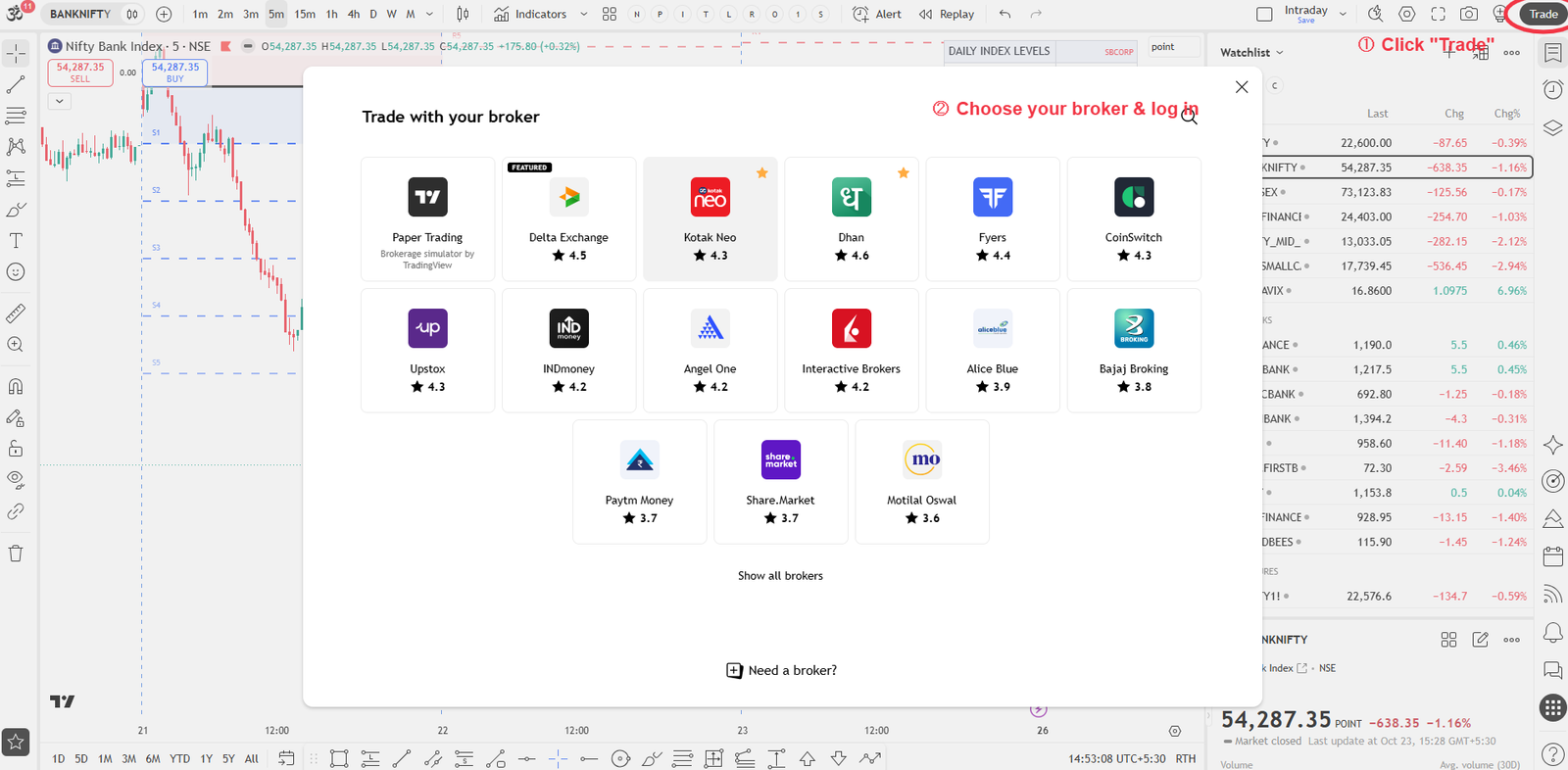
Tip: TradingView may ask you to log in to your broker again each day — just click Trade and reconnect before the market opens.Roz market khulne se pehle broker se dobara connect karna pad sakta hai.
Good to know
- Connecting a broker is free on TradingView. Your broker login goes directly to TradingView/your broker — SBCORP never sees your broker or TradingView password.
- Free TradingView plans allow a limited number of indicators per chart — remove unused ones if you hit the limit.
- If your broker is not in TradingView’s list, live prices may not be available through it.
- Need help? WhatsApp us with a screenshot and we’ll guide you.
TradingView and broker names are trademarks of their respective owners. SBCORP is not affiliated with TradingView or any broker. Our indicators are charting/educational tools only, not investment advice.